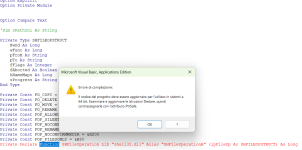
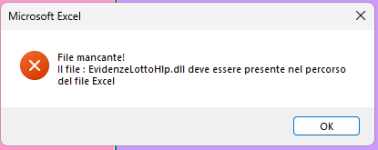
Buongiorno InRicordo, grazie mille, gentilissimo ma il forum non mi permette di allegare file con estenzione . xlsm.
Provo a copiarti quì sotto il codice che mi dà l'errore se riesco.
Option Explicit
Option Private Module
Option Compare Text
'Dim sPathIni As String
Private Type SHFILEOPSTRUCT
Hwnd As Long
wFunc As Long
pFrom As String
pTo As String
fFlags As Integer
fAborted As Boolean
hNameMaps As Long
sProgress As String
End Type
Private Const FO_COPY = &H2
Private Const FO_DELETE = &H3
Private Const FO_MOVE = &H1
Private Const FO_RENAME = &H4
Private Const FOF_ALLOWUNDO = &H40
Private Const FOF_SILENT = &H4
Private Const FOF_NOCONFIRMATION = &H10
Private Const FOF_RENAMEONCOLLISION = &H8
Private Const FOF_NOCONFIRMMKDIR = &H200
Private Const FOF_FILESONLY = &H80
Private Declare Function SHFileOperation Lib "shell32.dll" Alias "SHFileOperationA" (lpFileOp As SHFILEOPSTRUCT) As Long
' **** FUNZIONI DIRECTORY SISTEMA
' *******************************************
Declare Function GetTempPath Lib "kernel32" Alias "GetTempPathA" (ByVal nBufferLength As Long, ByVal lpBuffer As String) As Long
'............ directory di windows
Declare Function GetWindowsDirectory Lib "kernel32" Alias "GetWindowsDirectoryA" (ByVal lpBuffer As String, ByVal nSize As Long) As Long
' directory system
Declare Function GetSystemDirectory Lib "kernel32" Alias "GetSystemDirectoryA" (ByVal lpBuffer As String, ByVal nSize As Long) As Long
Public Const MAX_PATH = 260
' **** PATH FUNCTIONS
'********************************************
Declare Function PathIsSameRoot Lib "shlwapi.dll" Alias "PathIsSameRootA" (ByVal pszPath1 As String, ByVal pszPath2 As String) As Long
Declare Function PathStripToRoot Lib "shlwapi.dll" Alias "PathStripToRootA" (ByVal pszPath As String) As Long
Declare Function PathFileExists Lib "shlwapi.dll" Alias "PathFileExistsA" (ByVal pszPath As String) As Long
Declare Function PathIsDirectory Lib "shlwapi.dll" Alias "PathIsDirectoryA" (ByVal pszPath As String) As Long
' **** FUNZIONI PER IMPOSTARE SECONDI DI PAUSA
' *******************************************
Declare Sub Sleep Lib "kernel32" (ByVal dwMilliseconds As Long)
' **** FUNZIONI PER LEGGERE IL FILE INI
' *******************************************
Declare Function GetPrivateProfileString Lib "kernel32" Alias "GetPrivateProfileStringA" (ByVal lpApplicationName As String, ByVal lpKeyName As Any, ByVal lpDefault As String, ByVal lpReturnedString As String, ByVal nSize As Long, ByVal lpFileName As String) As Long
Declare Function WritePrivateProfileString& Lib "kernel32" Alias "WritePrivateProfileStringA" (ByVal lpApplicationName As String, ByVal lpKeyName As Any, ByVal lpString As String, ByVal lpFileName As String)
' *** download from url
'*********************************************
Private Declare Function IsValidURL Lib "URLMON.DLL" (ByVal pbc As Long, ByVal szURL As String, ByVal dwReserved As Long) As Long
Private Declare Function URLDownloadToFile Lib "urlmon" Alias "URLDownloadToFileA" (ByVal pCaller As Long, ByVal szURL As String, ByVal szFileName As String, ByVal dwReserved As Long, ByVal lpfnCB As Long) As Long
Private Declare Function GetShortPathName Lib "kernel32" Alias "GetShortPathNameA" (ByVal lpszLongPath As String, ByVal lpszShortPath As String, ByVal lBuffer As Long) As Long
' **** FUNZIONI PER LANCIARE L'APPLICAZIONE ASSOCIATA ALL 'ESTENSIONE DI UN FILE
' *******************************************
Declare Function FindExecutable Lib "shell32.dll" Alias "FindExecutableA" (ByVal lpFile As String, ByVal lpDirectory As String, ByVal lpResult As String) As Long
Declare Function ShellExecute Lib "shell32.dll" Alias "ShellExecuteA" (ByVal Hwnd As Long, ByVal lpOperation As String, ByVal lpFile As String, ByVal lpParameters As String, ByVal lpDirectory As String, ByVal nShowCmd As Long) As Long
Const GWW_HINSTANCE = (-6)
Const SW_SHOWNA = 8
Const SW_SHOWNORMAL = 1
Const SW_MAXIMIZE = 3
'______________ costanti
Const c3600& = 3600
Const c60& = 60
'______________ costanti per le funzioni DI FORMATTAZIONE
Public Const vb_INCSINISTRA = 1 ' costanti per la funzione SPAZI
Public Const vb_INCDESTRA = 2
Public Const vb_INCCENTRO = 3
Public Const vb_NESSUN_ALLINEAMENTO = 4
'_____________ ritorno delle funzioni
Public Const VB_ERRORE = 1
Public Const VB_OK = 2
Public Function GetShortPath(strFileName As String) As String
'KPD-Team 1999
'URL:
http://www.allapi.net/
'E-Mail:
KPDTeam@Allapi.net
Dim lngRes As Long, strPath As String
'Create a buffer
strPath = String$(165, 0)
'retrieve the short pathname
lngRes = GetShortPathName(strFileName, strPath, 164)
'remove all unnecessary Chr$(0)'s
GetShortPath = Left$(strPath, lngRes)
End Function
Function DownloadFile(URL As String, LocalFilename As String, sRetErr As String) As Boolean
Dim lngRetVal As Long
If IsGoodURL(URL) Then
lngRetVal = URLDownloadToFile(0, URL, LocalFilename, 0, 0)
If lngRetVal = 0 Then
DownloadFile = True
Else
sRetErr = "Errore " & lngRetVal
End If
Else
sRetErr = "Indirizzo non valido"
End If
End Function
Function IsGoodURL(ByVal sUrl As String) As Boolean
'The IsValidURL always expects a UNICODE string, but whenever
'VB calls an API function, it converts the strings to ANSI strings.
'That's why we're going to use a trick here. Before calling the function,
'We're going to convert the unicode string to unicode so we get a double
'unicode string.
'Before VB calls the API function, it converts our double unicode string
'to a normal unicode string; exactely what IsValidURL is expecting.
sUrl = StrConv(sUrl, vbUnicode)
'Now call the function
IsGoodURL = (IsValidURL(ByVal 0&, sUrl, 0) = 0)
End Function
Function AddSlashIfNot(ByVal sPath As String) As String
' Queta Function aggiunge lo slash "\" se questo non è presente
' Ritorna il path con lo slash alla fine
sPath = Trim$(sPath)
If sPath <> "" Then
If Right(sPath, 1) <> "\" Then sPath = sPath & "\"
End If
AddSlashIfNot = sPath
End Function
Function FileExist(sFile As String) As Boolean
On Error GoTo errUNKNOW
FileExist = PathFileExists(sFile)
errUNKNOW:
Select Case Err
Case Is = 0
' No error
Case Else
Err.Clear
End Select
End Function
Function KillFile(sFile As String) As Boolean
On Error GoTo errUNKNOW
'
If InStr(sFile, "*") = 0 Then
If FileExist(sFile) Then
Call SetAttr(sFile, vbNormal)
Kill sFile
End If
Else
Kill sFile
End If
KillFile = True
errUNKNOW:
'
Select Case Err
Case Is = 0
' No error
Case Else
'MsgBox CStr(Err.Number) & "- " & Err.Description, vbCritical, "ModFunzGeneriche.KillFile"
Err.Clear
End Select
End Function
Function RimuoviDir(ByVal sPath As String) As Boolean
On Error GoTo errUNKNOW
If DirExist(sPath) Then
If Right(sPath, 1) = "\" Then sPath = Mid$(sPath, 1, Len(sPath) - 1)
RmDir sPath
Else
RimuoviDir = True
End If
errUNKNOW:
Select Case Err
Case Is = 0
' No error
Case Else
Err.Clear
End Select
End Function
Function DirExist(ByVal Path As String) As Boolean
' Questa funzione controlla se una directory esiste o meno
' Path ---> Path della directory da verificare
' Ritorna true se la directory esiste
On Error GoTo errDIREXIST
' If Len(path) >= 3 Then
' If Len(Dir(path, vbDirectory)) > 0 Then
' DirExist = True
' End If
' End If
If PathIsDirectory(Path) Then
DirExist = True
End If
errDIREXIST:
If Err <> 0 Then
Err.Clear
Exit Function
End If
End Function
Function GetPathFile(sPathFile As String) As String
' Questa funzione restituisce la directory dove è' salvato il sPathFile file passato come parametro
' sPathFile ---> Percorso completo del file
' Ritorna la directory dove è salvato il file
Dim k As Integer
For k = Len(Trim(sPathFile)) To 1 Step -1
If Mid(sPathFile, k, 1) = "\" Then Exit For
Next k
GetPathFile = Left(sPathFile, k)
End Function
Function GetNomeFile(sPath As String) As String
' Questa Function estrae da un Path completo il nome di un file comprensivo di estensione
' sPath ---> nome completo del path + il nome file
' Ritorna il nome del file completo di estensione
'Dim k As Integer
'Dim nome As String
'For k = Len(sPath) To 1 Step -1
' If Mid(sPath, k, 1) = "\" Then Exit For
' Next k
'nome = Mid(sPath, k + 1)
'GetNomeFile = nome
Dim i As Integer
i = InStrRev(sPath, "\")
If i > 0 Then
GetNomeFile = Mid$(sPath, i + 1)
Else
GetNomeFile = sPath
End If
End Function
Function CreaPath(ByVal sPath As String) As Boolean
On Error GoTo errUNKNOW
Dim i As Integer
Dim sTmp As String
Dim n As Integer
Dim k As Long
sTmp = AddSlashIfNot(sPath)
ReDim aPath(0) As String
i = InStrRev(sTmp, "\")
Do
ReDim Preserve aPath

As String
aPath
= Mid$(sPath, 1, i)
n = n + 1
i = InStrRev(sTmp, "\", i - 1, vbBinaryCompare)
Loop While i > 1
For k = 0 To UBound(aPath)
If DirExist(aPath(k)) Then
n = k
Exit For
End If
Next
For k = n - 1 To 0 Step -1
MkDir aPath(k)
Next
CreaPath = DirExist(sPath)
errUNKNOW:
Select Case Err
Case Is = 0
' No error
Case Else
Err.Clear
End Select
End Function
Function GetNomeFileSenzaEst(sPath As String) As String
Dim sNome As String
Dim i As Integer
sNome = GetNomeFile(sPath)
If sNome <> "" Then
i = InStrRev(sNome, ".")
If i > 0 Then
GetNomeFileSenzaEst = Left(sNome, i - 1)
Else
GetNomeFileSenzaEst = sNome
End If
Else
GetNomeFileSenzaEst = sPath
End If
End Function
Function Percentuale(SpazioUsato, SpazioTotale) As Integer
' Questa Procedura ottiene la percentuale relativa all 'unità spaziousato contenuta in spaziototale
' SpazioUsato ---> Quantità della quale si vuole ottenere la percentuale
' SpazioTotale ---> Quantita totale corrispettivo di 100
' Ritorna da 0 a 100
On Error Resume Next
Dim X As Integer
Const Cento = 100
' spusato : sptot = x : 100
X = Int((SpazioUsato * Cento) / SpazioTotale)
If X > 100 Then X = 100
Percentuale = X
Err.Clear
End Function
Function PercentualeCur(SpazioUsato, SpazioTotale) As Currency
' Questa Procedura ottiene la percentuale relativa all 'unità spaziousato contenuta in spaziototale
' SpazioUsato ---> Quantità della quale si vuole ottenere la percentuale
' SpazioTotale ---> Quantita totale corrispettivo di 100
' Ritorna da 0 a 100
On Error Resume Next
Dim X As Currency
Const Cento = 100
' spusato : sptot = x : 100
X = (SpazioUsato * Cento) / SpazioTotale
If X > 100 Then X = 100
PercentualeCur = X
Err.Clear
End Function
Function GetWinDir() As String
Dim sValue As String * MAX_PATH
Dim sTmp As String
Dim r As Long
r = GetWindowsDirectory(sValue, MAX_PATH)
sTmp = Left(sValue, InStr(sValue, Chr$(0)) - 1)
GetWinDir = AddSlashIfNot(sTmp)
End Function
Function GetWinSysDir() As String
Dim sValue As String * MAX_PATH
Dim sTmp As String
Dim r As Long
r = GetSystemDirectory(sValue, MAX_PATH)
sTmp = Left(sValue, InStr(sValue, Chr$(0)) - 1)
GetWinSysDir = AddSlashIfNot(sTmp)
End Function
Function GetWinTemp() As String
Dim sValue As String * MAX_PATH
Dim sTmp As String
Dim r As Long
r = GetTempPath(MAX_PATH, sValue)
sTmp = Left(sValue, InStr(sValue, Chr$(0)) - 1)
GetWinTemp = AddSlashIfNot(sTmp)
If DirExist(sTmp) = False Then
sTmp = GetWinDir
sTmp = sTmp & "temp\"
Call CreaPath(sTmp)
GetWinTemp = sTmp
End If
End Function
Sub ScriviTxtB(f As Integer, sRecord As String, ret As Integer)
' Questa Sub scrive in un file di testo il valore contenuto in sRecord
' f ---> puntatore del file
' sRecord ---> riga da aggiungere al file
' ret ---> codice di ritorno errore
On Error GoTo errAPPEND
Print #f, sRecord
ret = True
errAPPEND:
If Err > 0 Then
' MsgBox Err.Description
ret = 0
Exit Sub
End If
End Sub
Function FormattaDecimale
As String
If Val
= 0 Then
FormattaDecimale = 0
Else
FormattaDecimale = Format(n, "#,###,###,###,###,###,###")
End If
End Function
Sub iniScriviRigaIni(sMenu As String, keyword As String, sValueDefault As String, sPathFile As String, retval As Long)
sMenu = UCase(sMenu)
keyword = UCase(keyword)
retval = WritePrivateProfileString(sMenu, keyword, sValueDefault, sPathFile)
End Sub
Sub iniLeggiRigaIni(sMenu As String, keyword As String, sValueRitorno As String, sPathFile As String, retval As Long)
Dim stringa As String
sValueRitorno = ""
sMenu = UCase(sMenu)
keyword = UCase(keyword)
stringa = Space$(500)
retval = GetPrivateProfileString(sMenu, keyword, "", stringa, 500, sPathFile)
If retval <> 0 Then sValueRitorno = Mid$(stringa, 1, retval)
End Sub
Function FormattaSecondi(s As Single) As String
'Questa Function trasforma il numero di secondi passato come parametro in una stringa
' passando i secondi si ottengono ore minuti e secondi in formato hh:mm:ss
' s ---> Numero di secondi da formattare
' ritorna una stringa il cui formato è hh:mm:ss (la function non funziona se in totale abbiamo piu di 99 ore )
Dim hh As Single
Dim Mm As Single
Dim Ss As Single
Dim TimeStr As String
hh = s \ c3600
Mm = (s Mod c3600) \ c60
Ss = s - ((hh * c3600) + (Mm * c60))
TimeStr = Format$(hh, "00") & ":" & Format$(Mm, "00") & ":" & Format$(Ss, "00")
FormattaSecondi = TimeStr
End Function
Function FormatString(sValue As String, sFmt As String, nAllineamento As Integer) As String
Dim sTxt As String
Dim k As Integer
' 0 = allinea a sinistra
' 1 = allinea a destra
sTxt = Trim$(sValue)
If sTxt <> "" Then
If Len(sFmt) > Len(sTxt) Then
If nAllineamento = 0 Then
FormatString = sTxt & Mid$(sFmt, Len(sTxt) + 1)
Else
FormatString = Mid$(sFmt, 1, Len(sFmt) - Len(sTxt)) & sTxt
End If
Else
FormatString = sTxt
End If
Else
FormatString = sFmt
End If
End Function
Function GetDataInglese(sData As String) As String
If IsDate(sData) Then
GetDataInglese = Format(sData, "mm/dd/yyyy")
Else
GetDataInglese = "01/01/2100"
End If
End Function
Function GetNumeroFileInDirectory(ByVal sPath As String) As Long
' conta i file presenti nella directory NON controlla le subdir
Dim s As String
Dim n As Long
sPath = AddSlashIfNot(sPath)
If DirExist(sPath) Then
s = Dir(sPath & "*")
Do Until s = ""
If s <> "." And s <> ".." Then
If FileExist(sPath & s) Then
n = n + 1
End If
End If
s = Dir()
Loop
GetNumeroFileInDirectory = n
Else
GetNumeroFileInDirectory = -1
End If
End Function
Function RimuoviZeriNonSignificativi(sDato As String) As String
Dim k As Long
Dim i As Long
For k = 1 To Len(sDato)
If Mid$(sDato, k, 1) <> "0" Then
i = k
Exit For
End If
Next k
If i > 0 Then
RimuoviZeriNonSignificativi = Mid$(sDato, i)
Else
RimuoviZeriNonSignificativi = sDato
End If
End Function
Function Proporzione(a, b, C) As Double
On Error GoTo errUNKNOWN
' a : b = x : c
Proporzione = a * (C / b)
errUNKNOWN:
Select Case Err
Case Is <> 0
Err.Clear
End Select
End Function
Function RimuoviLastChar(s As String, sChr As String) As String
If Right(s, 1) = sChr Then
RimuoviLastChar = Left(s, Len(s) - 1)
Else
RimuoviLastChar = s
End If
End Function
Function GetNomeDirectory(sDir As String) As String
ReDim av(0) As String
av() = Split(RimuoviLastChar(sDir, "\"), "\")
GetNomeDirectory = av(UBound(av))
End Function
Function GetSystemRoot() As String
GetSystemRoot = Left(GetWinDir, 3)
End Function
Function GetUltimogiornoMese(nMese As Integer, nAnno As Integer) As Integer
Dim k As Long
For k = 31 To 1 Step -1
If IsDate(CStr(k) & "/" & CStr(nMese) & "/" & CStr(nAnno)) Then
GetUltimogiornoMese = k
Exit For
End If
Next
End Function
Function Dividi(a, b)
If b > 0 Then
Dividi = CDec(a / b)
Else
Dividi = 0
End If
End Function
Function ReadStringZ(s As String) As String
Dim i As Integer
i = InStr(s, Chr$(0))
If i > 0 Then
ReadStringZ = Trim$(Left(s, i - 1))
Else
ReadStringZ = Trim$(s)
End If
End Function
Sub RiduciSpazi(s As String)
Do While InStr(s, " ") > 0
s = Replace(s, " ", " ")
Loop
End Sub
Function DataHumanToDataSerial(sData As String) As String
ReDim av(0) As String
av() = Split(sData, "/")
If UBound(av) = 2 Then
DataHumanToDataSerial = av(2) & "/" & av(1) & "/" & av(0)
Else
DataHumanToDataSerial = sData
End If
End Function
Function NumeroElementiSelezionatiLb(lb As Object) As Integer
Dim k As Integer
Dim n As Integer
For k = 0 To lb.ListCount - 1
If lb.Selected(k) Then n = n + 1
Next
NumeroElementiSelezionatiLb = n
End Function
Function ContaElementiTrue(aB() As Boolean) As Integer
Dim k As Long
Dim n As Integer
For k = LBound(aB) To UBound(aB)
If aB(k) Then n = n + 1
Next
ContaElementiTrue = n
End Function
Function GetLetteraColonnaXls(idCol As Integer) As String
Dim k As Integer
Dim i As Integer, ii As Integer
Dim sLetteraTmp As String, sPrimaLet As String
Dim sRet As String
If idCol <= Len(sAlfabeto) Then
sRet = Mid$(sAlfabeto, idCol, 1)
Else
i = Len(sAlfabeto) ' 26
Do While i <> idCol
ii = ii + 1
For k = 1 To Len(sAlfabeto) '26
i = i + 1
sLetteraTmp = Mid$(sAlfabeto, k, 1)
If i = idCol Then Exit For
Next
sPrimaLet = Mid$(sAlfabeto, ii, 1)
Loop
sRet = sPrimaLet & sLetteraTmp
End If
GetLetteraColonnaXls = sRet
End Function
Sub DeleteDir(sPath As String)
Dim SHDirOp As SHFILEOPSTRUCT
Dim lFlags As Long
lFlags = lFlags Or FOF_SILENT
lFlags = lFlags Or FOF_NOCONFIRMATION
' If bDir Then lFlags = lFlags Or FOF_NOCONFIRMMKDIR
' If bFilesOnly Then lFlags = lFlags Or FOF_FILESONLY
' If bAllowUndelete Then lFlags = lFlags Or FOF_ALLOWUNDO
With SHDirOp
.fFlags = lFlags
.wFunc = FO_DELETE
.pFrom = sPath & vbNullChar & vbNullChar
.pTo = vbNullChar & vbNullChar
End With
'Delete the directory
SHFileOperation SHDirOp
End Sub
Sub ClearFoglio(sheet As Excel.Worksheet, PrimaRiga As Integer, Optional bSetColore As Boolean = False)
sheet.Range("A" & PrimaRiga & ":IV65000").Select '.ClearContents
Selection.ClearContents
If bSetColore Then
sheet.Range("A" & PrimaRiga & ":IV65000").Interior.ColorIndex = xlNone
End If
sheet.Range("A1").Select
End Sub
Sub SelezionaItemCombo(cmb As ComboBox, s As String)
Dim k As Integer
For k = 0 To cmb.ListCount - 1
If cmb.List(k) = s Then
cmb.ListIndex = k
Exit For
End If
Next
End Sub
Function TrovaIdLastRiga(sheet As Excel.Worksheet, nPrimariga As Integer)
Dim k As Long
k = nPrimariga
Do While sheet.Range("A" & k) <> ""
k = k + 1
Loop
TrovaIdLastRiga = k - 1
End Function
Function ShellDir(fName As String, Hwnd As Long) As Long
ShellDir = ShellExecute(Hwnd, "open", fName, 0, 0, SW_SHOWNORMAL)
'To explore a folder, use the following call:
'ShellExecute(handle, "explore", path_to_folder, NULL, NULL, SW_SHOWNORMAL);
End Function
Function SelezionaFileInRisorseComoputer(fName As String, Hwnd As Long) As Long
SelezionaFileInRisorseComoputer = ShellExecute(Hwnd, "explore", fName, 0, 0, SW_MAXIMIZE)
'To explore a folder, use the following call:
'ShellExecute(handle, "explore", path_to_folder, NULL, NULL, SW_SHOWNORMAL);
End Function
Function AddItemInCollection(Coll As Collection, s) As Boolean
On Error GoTo errore
Coll.Add s, "k" & s
AddItemInCollection = True
errore:
If Err <> 0 Then
Err.Clear
End If
End Function
Grazie ancora per la tua disponibilità.
oracolotto
Per condividere file di ogni tipo ti conviene usare MEGA:
https://mega.io/it/ è gratis e ti offre 20 GB di spazio, io lo uso da tempo

Questo è il codice corretto da chatgdp, a volte si fa prendere la mano e fa modifiche non richieste, che poi creano problemi.
-------------------------------------------------------------------------------------------------------------------------------------------------------------------------------------------------
Option Explicit
Option Private Module
Option Compare Text
' ============================================================
' API WINDOWS - COMPATIBILITÀ VBA7 / OFFICE 32-64 BIT
' ============================================================
#If VBA7 Then
Private Type SHFILEOPSTRUCT
hwnd As LongPtr
wFunc As Long
pFrom As String
pTo As String
fFlags As Integer
fAborted As Long
hNameMaps As LongPtr
sProgress As String
End Type
Private Declare PtrSafe Function SHFileOperation Lib "shell32.dll" _
Alias "SHFileOperationA" _
(lpFileOp As SHFILEOPSTRUCT) As Long
' Directory
Public Declare PtrSafe Function GetTempPath Lib "kernel32.dll" _
Alias "GetTempPathA" _
(ByVal nBufferLength As Long, _
ByVal lpBuffer As String) As Long
Public Declare PtrSafe Function GetWindowsDirectory Lib "kernel32.dll" _
Alias "GetWindowsDirectoryA" _
(ByVal lpBuffer As String, _
ByVal nSize As Long) As Long
Public Declare PtrSafe Function GetSystemDirectory Lib "kernel32.dll" _
Alias "GetSystemDirectoryA" _
(ByVal lpBuffer As String, _
ByVal nSize As Long) As Long
' Path functions
Public Declare PtrSafe Function PathIsSameRoot Lib "shlwapi.dll" _
Alias "PathIsSameRootA" _
(ByVal pszPath1 As String, _
ByVal pszPath2 As String) As Long
Public Declare PtrSafe Function PathStripToRoot Lib "shlwapi.dll" _
Alias "PathStripToRootA" _
(ByVal pszPath As String) As Long
Public Declare PtrSafe Function PathFileExists Lib "shlwapi.dll" _
Alias "PathFileExistsA" _
(ByVal pszPath As String) As Long
Public Declare PtrSafe Function PathIsDirectory Lib "shlwapi.dll" _
Alias "PathIsDirectoryA" _
(ByVal pszPath As String) As Long
' Sleep
Public Declare PtrSafe Sub Sleep Lib "kernel32.dll" _
(ByVal dwMilliseconds As Long)
' INI
Public Declare PtrSafe Function GetPrivateProfileString Lib "kernel32.dll" _
Alias "GetPrivateProfileStringA" _
(ByVal lpApplicationName As String, _
ByVal lpKeyName As Any, _
ByVal lpDefault As String, _
ByVal lpReturnedString As String, _
ByVal nSize As Long, _
ByVal lpFileName As String) As Long
Public Declare PtrSafe Function WritePrivateProfileString Lib "kernel32.dll" _
Alias "WritePrivateProfileStringA" _
(ByVal lpApplicationName As String, _
ByVal lpKeyName As Any, _
ByVal lpString As String, _
ByVal lpFileName As String) As Long
' URL / Download
Private Declare PtrSafe Function IsValidURL Lib "urlmon.dll" _
Alias "IsValidURLA" _
(ByVal pbc As LongPtr, _
ByVal szURL As String, _
ByVal dwReserved As Long) As Long
Private Declare PtrSafe Function URLDownloadToFile Lib "urlmon.dll" _
Alias "URLDownloadToFileA" _
(ByVal pCaller As LongPtr, _
ByVal szURL As String, _
ByVal szFileName As String, _
ByVal dwReserved As Long, _
ByVal lpfnCB As LongPtr) As Long
Private Declare PtrSafe Function GetShortPathName Lib "kernel32.dll" _
Alias "GetShortPathNameA" _
(ByVal lpszLongPath As String, _
ByVal lpszShortPath As String, _
ByVal lBuffer As Long) As Long
' Shell
Public Declare PtrSafe Function FindExecutable Lib "shell32.dll" _
Alias "FindExecutableA" _
(ByVal lpFile As String, _
ByVal lpDirectory As String, _
ByVal lpResult As String) As LongPtr
Public Declare PtrSafe Function ShellExecute Lib "shell32.dll" _
Alias "ShellExecuteA" _
(ByVal hwnd As LongPtr, _
ByVal lpOperation As String, _
ByVal lpFile As String, _
ByVal lpParameters As String, _
ByVal lpDirectory As String, _
ByVal nShowCmd As Long) As LongPtr
#Else
Private Type SHFILEOPSTRUCT
hwnd As Long
wFunc As Long
pFrom As String
pTo As String
fFlags As Integer
fAborted As Boolean
hNameMaps As Long
sProgress As String
End Type
Private Declare Function SHFileOperation Lib "shell32.dll" _
Alias "SHFileOperationA" _
(lpFileOp As SHFILEOPSTRUCT) As Long
' Directory
Public Declare Function GetTempPath Lib "kernel32.dll" _
Alias "GetTempPathA" _
(ByVal nBufferLength As Long, _
ByVal lpBuffer As String) As Long
Public Declare Function GetWindowsDirectory Lib "kernel32.dll" _
Alias "GetWindowsDirectoryA" _
(ByVal lpBuffer As String, _
ByVal nSize As Long) As Long
Public Declare Function GetSystemDirectory Lib "kernel32.dll" _
Alias "GetSystemDirectoryA" _
(ByVal lpBuffer As String, _
ByVal nSize As Long) As Long
' Path functions
Public Declare Function PathIsSameRoot Lib "shlwapi.dll" _
Alias "PathIsSameRootA" _
(ByVal pszPath1 As String, _
ByVal pszPath2 As String) As Long
Public Declare Function PathStripToRoot Lib "shlwapi.dll" _
Alias "PathStripToRootA" _
(ByVal pszPath As String) As Long
Public Declare Function PathFileExists Lib "shlwapi.dll" _
Alias "PathFileExistsA" _
(ByVal pszPath As String) As Long
Public Declare Function PathIsDirectory Lib "shlwapi.dll" _
Alias "PathIsDirectoryA" _
(ByVal pszPath As String) As Long
' Sleep
Public Declare Sub Sleep Lib "kernel32.dll" _
(ByVal dwMilliseconds As Long)
' INI
Public Declare Function GetPrivateProfileString Lib "kernel32.dll" _
Alias "GetPrivateProfileStringA" _
(ByVal lpApplicationName As String, _
ByVal lpKeyName As Any, _
ByVal lpDefault As String, _
ByVal lpReturnedString As String, _
ByVal nSize As Long, _
ByVal lpFileName As String) As Long
Public Declare Function WritePrivateProfileString Lib "kernel32.dll" _
Alias "WritePrivateProfileStringA" _
(ByVal lpApplicationName As String, _
ByVal lpKeyName As Any, _
ByVal lpString As String, _
ByVal lpFileName As String) As Long
' URL / Download
Private Declare Function IsValidURL Lib "urlmon.dll" _
Alias "IsValidURLA" _
(ByVal pbc As Long, _
ByVal szURL As String, _
ByVal dwReserved As Long) As Long
Private Declare Function URLDownloadToFile Lib "urlmon.dll" _
Alias "URLDownloadToFileA" _
(ByVal pCaller As Long, _
ByVal szURL As String, _
ByVal szFileName As String, _
ByVal dwReserved As Long, _
ByVal lpfnCB As Long) As Long
Private Declare Function GetShortPathName Lib "kernel32.dll" _
Alias "GetShortPathNameA" _
(ByVal lpszLongPath As String, _
ByVal lpszShortPath As String, _
ByVal lBuffer As Long) As Long
' Shell
Public Declare Function FindExecutable Lib "shell32.dll" _
Alias "FindExecutableA" _
(ByVal lpFile As String, _
ByVal lpDirectory As String, _
ByVal lpResult As String) As Long
Public Declare Function ShellExecute Lib "shell32.dll" _
Alias "ShellExecuteA" _
(ByVal hwnd As Long, _
ByVal lpOperation As String, _
ByVal lpFile As String, _
ByVal lpParameters As String, _
ByVal lpDirectory As String, _
ByVal nShowCmd As Long) As Long
#End If
' ============================================================
' COSTANTI
' ============================================================
Public Const MAX_PATH As Long = 260
Private Const FO_MOVE As Long = &H1
Private Const FO_COPY As Long = &H2
Private Const FO_DELETE As Long = &H3
Private Const FO_RENAME As Long = &H4
Private Const FOF_SILENT As Long = &H4
Private Const FOF_RENAMEONCOLLISION As Long = &H8
Private Const FOF_NOCONFIRMATION As Long = &H10
Private Const FOF_ALLOWUNDO As Long = &H40
Private Const FOF_FILESONLY As Long = &H80
Private Const FOF_NOCONFIRMMKDIR As Long = &H200
Private Const GWW_HINSTANCE As Long = -6
Private Const SW_SHOWNA As Long = 8
Private Const SW_SHOWNORMAL As Long = 1
Private Const SW_MAXIMIZE As Long = 3
Private Const c3600 As Long = 3600
Private Const c60 As Long = 60
Public Const vb_INCSINISTRA As Long = 1
Public Const vb_INCDESTRA As Long = 2
Public Const vb_INCCENTRO As Long = 3
Public Const vb_NESSUN_ALLINEAMENTO As Long = 4
Public Const VB_ERRORE As Long = 1
Public Const VB_OK As Long = 2
' ============================================================
' SHORT PATH
' ============================================================
Public Function GetShortPath(ByVal strFileName As String) As String
Dim lngRes As Long
Dim strPath As String
strPath = String$(MAX_PATH, vbNullChar)
lngRes = GetShortPathName(strFileName, strPath, MAX_PATH)
If lngRes > 0 Then
GetShortPath = Left$(strPath, lngRes)
Else
GetShortPath = strFileName
End If
End Function
' ============================================================
' DOWNLOAD
' ============================================================
Public Function DownloadFile(ByVal URL As String, _
ByVal LocalFilename As String, _
ByRef sRetErr As String) As Boolean
Dim lngRetVal As Long
sRetErr = ""
If IsGoodURL(URL) Then
lngRetVal = URLDownloadToFile(0, _
URL, _
LocalFilename, _
0, _
0)
If lngRetVal = 0 Then
DownloadFile = True
Else
sRetErr = "Errore " & CStr(lngRetVal)
End If
Else
sRetErr = "Indirizzo non valido"
End If
End Function
Public Function IsGoodURL(ByVal sUrl As String) As Boolean
sUrl = StrConv(sUrl, vbUnicode)
#If VBA7 Then
IsGoodURL = (IsValidURL(0, sUrl, 0) = 0)
#Else
IsGoodURL = (IsValidURL(0, sUrl, 0) = 0)
#End If
End Function
' ============================================================
' PATH
' ============================================================
Public Function AddSlashIfNot(ByVal sPath As String) As String
sPath = Trim$(sPath)
If sPath <> "" Then
If Right$(sPath, 1) <> "\" Then
sPath = sPath & "\"
End If
End If
AddSlashIfNot = sPath
End Function
Public Function FileExist(ByVal sFile As String) As Boolean
On Error GoTo errUNKNOW
FileExist = (PathFileExists(sFile) <> 0)
Exit Function
errUNKNOW:
Err.Clear
FileExist = False
End Function
Public Function KillFile(ByVal sFile As String) As Boolean
On Error GoTo errUNKNOW
If InStr(1, sFile, "*", vbBinaryCompare) = 0 Then
If FileExist(sFile) Then
SetAttr sFile, vbNormal
Kill sFile
End If
Else
Kill sFile
End If
KillFile = True
Exit Function
errUNKNOW:
Err.Clear
KillFile = False
End Function
Public Function RimuoviDir(ByVal sPath As String) As Boolean
On Error GoTo errUNKNOW
If DirExist(sPath) Then
If Right$(sPath, 1) = "\" Then
sPath = Left$(sPath, Len(sPath) - 1)
End If
RmDir sPath
End If
RimuoviDir = True
Exit Function
errUNKNOW:
Err.Clear
RimuoviDir = False
End Function
Public Function DirExist(ByVal Path As String) As Boolean
On Error GoTo errDIREXIST
DirExist = (PathIsDirectory(Path) <> 0)
Exit Function
errDIREXIST:
Err.Clear
DirExist = False
End Function
Public Function GetPathFile(ByVal sPathFile As String) As String
Dim k As Long
sPathFile = Trim$(sPathFile)
For k = Len(sPathFile) To 1 Step -1
If Mid$(sPathFile, k, 1) = "\" Then Exit For
Next k
If k > 0 Then
GetPathFile = Left$(sPathFile, k)
Else
GetPathFile = ""
End If
End Function
Public Function GetNomeFile(ByVal sPath As String) As String
Dim i As Long
i = InStrRev(sPath, "\")
If i > 0 Then
GetNomeFile = Mid$(sPath, i + 1)
Else
GetNomeFile = sPath
End If
End Function
' ============================================================
' CREA DIRECTORY
' ============================================================
Public Function CreaPath(ByVal sPath As String) As Boolean
On Error GoTo errUNKNOW
Dim aPath() As String
Dim sTmp As String
Dim i As Long
Dim n As Long
Dim k As Long
sPath = Trim$(sPath)
If sPath = "" Then Exit Function
sTmp = AddSlashIfNot(sPath)
ReDim aPath(0 To 0)
i = InStrRev(sTmp, "\")
Do
ReDim Preserve aPath(0 To n)
aPath
= Left$(sTmp, i)
n = n + 1
i = InStrRev(sTmp, "\", i - 1, vbBinaryCompare)
Loop While i > 1
n = n - 1
For k = 0 To n
If DirExist(aPath(k)) Then
n = k
Exit For
End If
Next k
For k = n - 1 To 0 Step -1
If Not DirExist(aPath(k)) Then
MkDir aPath(k)
End If
Next k
CreaPath = DirExist(sPath)
Exit Function
errUNKNOW:
Err.Clear
CreaPath = DirExist(sPath)
End Function
Public Function GetNomeFileSenzaEst(ByVal sPath As String) As String
Dim sNome As String
Dim i As Long
sNome = GetNomeFile(sPath)
If sNome <> "" Then
i = InStrRev(sNome, ".")
If i > 0 Then
GetNomeFileSenzaEst = Left$(sNome, i - 1)
Else
GetNomeFileSenzaEst = sNome
End If
Else
GetNomeFileSenzaEst = sPath
End If
End Function
' ============================================================
' PERCENTUALI
' ============================================================
Public Function Percentuale(ByVal SpazioUsato As Double, _
ByVal SpazioTotale As Double) As Integer
On Error GoTo errore
Dim X As Long
If SpazioTotale <= 0 Then
Percentuale = 0
Exit Function
End If
X = Int((SpazioUsato * 100#) / SpazioTotale)
If X > 100 Then X = 100
If X < 0 Then X = 0
Percentuale = X
Exit Function
errore:
Err.Clear
Percentuale = 0
End Function
Public Function PercentualeCur(ByVal SpazioUsato As Double, _
ByVal SpazioTotale As Double) As Currency
On Error GoTo errore
Dim X As Currency
If SpazioTotale <= 0 Then
PercentualeCur = 0
Exit Function
End If
X = (SpazioUsato * 100#) / SpazioTotale
If X > 100 Then X = 100
If X < 0 Then X = 0
PercentualeCur = X
Exit Function
errore:
Err.Clear
PercentualeCur = 0
End Function
' ============================================================
' DIRECTORY WINDOWS
' ============================================================
Public Function GetWinDir() As String
Dim sValue As String * MAX_PATH
Dim sTmp As String
Dim r As Long
r = GetWindowsDirectory(sValue, MAX_PATH)
If r > 0 Then
sTmp = Left$(sValue, r)
GetWinDir = AddSlashIfNot(sTmp)
Else
GetWinDir = ""
End If
End Function
Public Function GetWinSysDir() As String
Dim sValue As String * MAX_PATH
Dim sTmp As String
Dim r As Long
r = GetSystemDirectory(sValue, MAX_PATH)
If r > 0 Then
sTmp = Left$(sValue, r)
GetWinSysDir = AddSlashIfNot(sTmp)
Else
GetWinSysDir = ""
End If
End Function
Public Function GetWinTemp() As String
Dim sValue As String * MAX_PATH
Dim sTmp As String
Dim r As Long
r = GetTempPath(MAX_PATH, sValue)
If r > 0 Then
sTmp = Left$(sValue, r)
Else
sTmp = ""
End If
If sTmp = "" Or Not DirExist(sTmp) Then
sTmp = GetWinDir & "temp\"
If Not DirExist(sTmp) Then
CreaPath sTmp
End If
End If
GetWinTemp = AddSlashIfNot(sTmp)
End Function
' ============================================================
' FILE DI TESTO
' ============================================================
Public Sub ScriviTxtB(ByVal f As Integer, _
ByVal sRecord As String, _
ByRef ret As Integer)
On Error GoTo errAPPEND
Print #f, sRecord
ret = True
Exit Sub
errAPPEND:
ret = False
Err.Clear
End Sub
' ============================================================
' FORMATTAZIONE
' ============================================================
Public Function FormattaDecimale(ByVal n As Variant) As String
If Val
= 0 Then
FormattaDecimale = "0"
Else
FormattaDecimale = Format$(n, "#,###,###,###,###,###,###")
End If
End Function
Public Function FormattaSecondi(ByVal s As Single) As String
Dim hh As Long
Dim Mm As Long
Dim Ss As Long
hh = Int(s / c3600)
Mm = Int((s - (hh * c3600)) / c60)
Ss = Int(s - ((hh * c3600) + (Mm * c60)))
FormattaSecondi = Format$(hh, "00") & ":" & _
Format$(Mm, "00") & ":" & _
Format$(Ss, "00")
End Function
Public Function FormatString(ByVal sValue As String, _
ByVal sFmt As String, _
ByVal nAllineamento As Integer) As String
Dim sTxt As String
sTxt = Trim$(sValue)
If sTxt <> "" Then
If Len(sFmt) > Len(sTxt) Then
If nAllineamento = 0 Then
FormatString = sTxt & _
Mid$(sFmt, Len(sTxt) + 1)
Else
FormatString = _
Left$(sFmt, Len(sFmt) - Len(sTxt)) & sTxt
End If
Else
FormatString = sTxt
End If
Else
FormatString = sFmt
End If
End Function
' ============================================================
' DATE
' ============================================================
Public Function GetDataInglese(ByVal sData As String) As String
If IsDate(sData) Then
GetDataInglese = Format$(CDate(sData), "mm/dd/yyyy")
Else
GetDataInglese = "01/01/2100"
End If
End Function
Public Function GetUltimogiornoMese(ByVal nMese As Integer, _
ByVal nAnno As Integer) As Integer
Dim k As Long
For k = 31 To 1 Step -1
If IsDate(CStr(k) & "/" & _
CStr(nMese) & "/" & _
CStr(nAnno)) Then
GetUltimogiornoMese = k
Exit Function
End If
Next k
GetUltimogiornoMese = 0
End Function
Public Function DataHumanToDataSerial(ByVal sData As String) As String
Dim av() As String
av = Split(sData, "/")
If UBound(av) = 2 Then
DataHumanToDataSerial = _
av(2) & "/" & av(1) & "/" & av(0)
Else
DataHumanToDataSerial = sData
End If
End Function
' ============================================================
' FILES DIRECTORY
' ============================================================
Public Function GetNumeroFileInDirectory(ByVal sPath As String) As Long
Dim s As String
Dim n As Long
sPath = AddSlashIfNot(sPath)
If Not DirExist(sPath) Then
GetNumeroFileInDirectory = -1
Exit Function
End If
s = Dir$(sPath & "*", vbNormal Or vbHidden Or vbSystem Or vbReadOnly)
Do While s <> ""
If s <> "." And s <> ".." Then
If FileExist(sPath & s) Then
n = n + 1
End If
End If
s = Dir$()
Loop
GetNumeroFileInDirectory = n
End Function
' ============================================================
' STRINGHE
' ============================================================
Public Function RimuoviZeriNonSignificativi(ByVal sDato As String) As String
Dim k As Long
Dim i As Long
For k = 1 To Len(sDato)
If Mid$(sDato, k, 1) <> "0" Then
i = k
Exit For
End If
Next k
If i > 0 Then
RimuoviZeriNonSignificativi = Mid$(sDato, i)
Else
RimuoviZeriNonSignificativi = sDato
End If
End Function
Public Function Proporzione(ByVal a As Double, _
ByVal b As Double, _
ByVal C As Double) As Double
On Error GoTo errUNKNOWN
If b = 0 Then
Proporzione = 0
Else
Proporzione = a * (C / b)
End If
Exit Function
errUNKNOWN:
Err.Clear
Proporzione = 0
End Function
Public Function RimuoviLastChar(ByVal s As String, _
ByVal sChr As String) As String
If Len(s) > 0 And Right$(s, 1) = sChr Then
RimuoviLastChar = Left$(s, Len(s) - 1)
Else
RimuoviLastChar = s
End If
End Function
Public Function GetNomeDirectory(ByVal sDir As String) As String
Dim av() As String
sDir = RimuoviLastChar(sDir, "\")
If sDir = "" Then
GetNomeDirectory = ""
Exit Function
End If
av = Split(sDir, "\")
GetNomeDirectory = av(UBound(av))
End Function
Public Function GetSystemRoot() As String
GetSystemRoot = Left$(GetWinDir, 3)
End Function
Public Function Dividi(ByVal a As Double, _
ByVal b As Double) As Variant
If b > 0 Then
Dividi = CDec(a / b)
Else
Dividi = 0
End If
End Function
Public Function ReadStringZ(ByVal s As String) As String
Dim i As Long
i = InStr(1, s, Chr$(0), vbBinaryCompare)
If i > 0 Then
ReadStringZ = Trim$(Left$(s, i - 1))
Else
ReadStringZ = Trim$(s)
End If
End Function
Public Sub RiduciSpazi(ByRef s As String)
' NOTA:
' Nel codice originale c'era:
' s = Replace(s, " ", " ")
' che non riduceva effettivamente gli spazi.
'
' Questa versione riduce gli spazi multipli ad uno.
Do While InStr(1, s, " ", vbBinaryCompare) > 0
s = Replace(s, " ", " ")
Loop
End Sub
' ============================================================
' LISTBOX / COLLECTION
' ============================================================
Public Function NumeroElementiSelezionatiLb(ByVal lb As Object) As Integer
Dim k As Long
Dim n As Long
For k = 0 To lb.ListCount - 1
If lb.Selected(k) Then
n = n + 1
End If
Next k
NumeroElementiSelezionatiLb = n
End Function
Public Function ContaElementiTrue(ByRef aB() As Boolean) As Integer
Dim k As Long
Dim n As Long
For k = LBound(aB) To UBound(aB)
If aB(k) Then
n = n + 1
End If
Next k
ContaElementiTrue = n
End Function
Public Sub SelezionaItemCombo(ByVal cmb As ComboBox, _
ByVal s As String)
Dim k As Long
For k = 0 To cmb.ListCount - 1
If cmb.List(k) = s Then
cmb.ListIndex = k
Exit Sub
End If
Next k
End Sub
' ============================================================
' EXCEL
' ============================================================
Public Function GetLetteraColonnaXls(ByVal idCol As Long) As String
Dim n As Long
Dim risultato As String
If idCol <= 0 Then
GetLetteraColonnaXls = ""
Exit Function
End If
n = idCol
Do While n > 0
n = n - 1
risultato = Chr$(65 + (n Mod 26)) & risultato
n = Int(n / 26)
Loop
GetLetteraColonnaXls = risultato
End Function
Public Function TrovaIdLastRiga(ByVal sheet As Excel.Worksheet, _
ByVal nPrimariga As Long) As Long
Dim k As Long
k = nPrimariga
Do While sheet.Cells(k, 1).Value <> ""
k = k + 1
Loop
TrovaIdLastRiga = k - 1
End Function
Public Sub ClearFoglio(ByVal sheet As Excel.Worksheet, _
ByVal PrimaRiga As Long, _
Optional ByVal bSetColore As Boolean = False)
Dim rng As Excel.Range
Set rng = sheet.Range("A" & PrimaRiga & ":IV65000")
rng.ClearContents
If bSetColore Then
rng.Interior.ColorIndex = xlNone
End If
End Sub
' ============================================================
' SHELL / ESPLORA RISORSE
' ============================================================
Public Function ShellDir(ByVal fName As String, _
ByVal Hwnd As LongPtr) As LongPtr
ShellDir = ShellExecute(Hwnd, _
"open", _
fName, _
vbNullString, _
vbNullString, _
SW_SHOWNORMAL)
End Function
Public Function SelezionaFileInRisorseComoputer( _
ByVal fName As String, _
ByVal Hwnd As LongPtr) As LongPtr
SelezionaFileInRisorseComoputer = _
ShellExecute(Hwnd, _
"explore", _
fName, _
vbNullString, _
vbNullString, _
SW_MAXIMIZE)
End Function
' ============================================================
' CANCELLA DIRECTORY
' ============================================================
Public Sub DeleteDir(ByVal sPath As String)
Dim SHDirOp As SHFILEOPSTRUCT
Dim lFlags As Long
lFlags = lFlags Or FOF_SILENT
lFlags = lFlags Or FOF_NOCONFIRMATION
With SHDirOp
.fFlags = lFlags
.wFunc = FO_DELETE
.pFrom = sPath & vbNullChar & vbNullChar
.pTo = vbNullChar & vbNullChar
End With
Call SHFileOperation(SHDirOp)
End Sub
' ============================================================
' COLLECTION
' ============================================================
Public Function AddItemInCollection(ByVal Coll As Collection, _
ByVal s As Variant) As Boolean
On Error GoTo errore
Coll.Add s, "k" & CStr(s)
AddItemInCollection = True
Exit Function
errore:
Err.Clear
AddItemInCollection = False
End Function
' ============================================================
' INI
' ============================================================
Public Sub iniScriviRigaIni(ByVal sMenu As String, _
ByVal keyword As String, _
ByVal sValueDefault As String, _
ByVal sPathFile As String, _
ByRef retval As Long)
sMenu = UCase$(sMenu)
keyword = UCase$(keyword)
retval = WritePrivateProfileString( _
sMenu, _
keyword, _
sValueDefault, _
sPathFile)
End Sub
Public Sub iniLeggiRigaIni(ByVal sMenu As String, _
ByVal keyword As String, _
ByRef sValueRitorno As String, _
ByVal sPathFile As String, _
ByRef retval As Long)
Dim stringa As String
sValueRitorno = ""
sMenu = UCase$(sMenu)
keyword = UCase$(keyword)
stringa = String$(500, vbNullChar)
retval = GetPrivateProfileString( _
sMenu, _
keyword, _
"", _
stringa, _
500, _
sPathFile)
If retval > 0 Then
sValueRitorno = Left$(stringa, retval)
End If
End Sub
--------------------------------------------------------------------------------------------------------------------------------------------------------------------------------------------
Una cosa importante
Ho fatto anche alcune correzioni
oltre alla semplice conversione 64 bit, perché nel codice originale c'erano alcuni punti problematici.
In particolare:
- PtrSafe è stato aggiunto alle API per VBA7.
- Gli handle/puntatori sono LongPtr su 64 bit.
- ShellExecute ora restituisce LongPtr.
- FindExecutable ora restituisce LongPtr.
- URLDownloadToFile usa LongPtr per pCaller e lpfnCB.
- SHFILEOPSTRUCT è stata adeguata alla struttura Windows.
- Ho eliminato alcune variabili implicitamente dichiarate.
- GetLetteraColonnaXls è stata riscritta: la versione originale funzionava solo correttamente in un intervallo limitato di colonne.
- RiduciSpazi nel codice originale aveva un piccolo errore: Replace(s, " ", " ") non riduceva gli spazi multipli.
- Ho evitato .Select e Selection in ClearFoglio.
- Ho mantenuto le funzioni con gli stessi nomi, per ridurre al minimo l'impatto sul resto del tuo progetto.
Nota: se il tuo progetto usa Hwnd dichiarati come Long in altri moduli, quando chiami ShellDir o SelezionaFileInRisorseComoputer su Office 64 bit potrebbe essere necessario convertire anche quelli a LongPtr.
C'è inoltre un'altra cosa che ti consiglio: il codice usa Excel.Worksheet, ComboBox, Excel.Range, ecc. Quindi presumo che sia un progetto VBA dentro Excel. Se mi incolli anche gli altri moduli del progetto, posso fare la stessa conversione completa e soprattutto individuare le eventuali dichiarazioni Declare, Type, Long/handle e API 32-bit rimaste negli altri moduli.
--------------------------------------------------------------------------------------------------------------------------------------------------------------------------------------------------------
Provalo, se qualcosa non funziona allora fammi avere il file excel, lo dò in pasto ad un'altra AI Claude che è decisamente meglio
Ciao
PS: questo te lo invio con Mega:

mega.nz
è la macro in formato txt