TONY@
Advanced Member >PLATINUM PLUS<
Buongiorno un piccolo problema che non riesco a risolvere
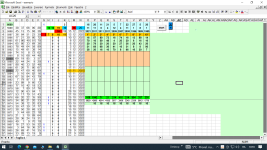
la macro mi ordina i numeri cercati in verticale ,io ho bisogno di vederli in orizzontale
se considero solo un uscita estraz...riesco a farli mettere in orizz, ma quando ci sono più uscite tipo 5
allora non si può fare li accavalla i risultati ,non sono molto pratico di macro ,come posso risolvere il problema ?
Vorrei che le estraz..che trova le disponga riga per riga da o5 -s5
in giù a scendere come da esempio 2 sotto.
grazie mille forse e una piccolezza ma non trovo la soluzione
74
64 esempio
90 cosi sono adesso metto solo due colonne di esempio
32
43
20
7
42
40
66
..............................................................................................
esempio 2
74 64 90 32 43 <<<<cosi andrebbero benissimo a scendere
20 7 42 40 66
.................................................................................
H2 I2 J3 K2
10 10 5
5
-----------------------------------------------------------------------------------------------
Sub UNOSOPRA()
Range("O5:Z9").ClearContents
UE = Worksheets("Foglio1").Range("A" & Rows.Count).End(xlUp).Row
Area = Worksheets("Foglio1").Range("A6:AX" & UE)
valore = Range("g4").Value
If [i2] > 50 Then
MsgBox "Digitare N. Colonne (da 2 a 50)"
Range("h2").Select
GoTo Fine
End If
If [h2] = 0 Then
MsgBox "Digitare N. Colonne (da 1 a 49)"
Range("i2").Select
GoTo Fine
End If
If [h2] > [i2] Then
MsgBox "Inizio N. Colonne maggiore di Fine N. Colonne, correggere!"
Range("j2").Select
GoTo Fine
End If
If [J2] = "" Then
MsgBox "digitare inizio riga"
Range("J2").Select
GoTo Fine
End If
If [g4] = "" Then
MsgBox "digitare Numeri da trovare"
Range("K2").Select
GoTo Fine
End If
inizio = [J2]
For RR = inizio To UE
For CC = [h2] To [i2]
If Worksheets("Foglio1").Cells(RR, CC).Value = valore Then
Cells(5, TR + 15).Value = Worksheets("Foglio1").Cells(RR - 1, CC - 8).Value
Cells(6, TR + 15).Value = Worksheets("Foglio1").Cells(RR - 1, CC - 7).Value
Cells(7, TR + 15).Value = Worksheets("Foglio1").Cells(RR - 1, CC - 6).Value
Cells(8, TR + 15).Value = Worksheets("Foglio1").Cells(RR - 1, CC - 5).Value
Cells(9, TR + 15).Value = Worksheets("Foglio1").Cells(RR - 1, CC - 4).Value
TR = TR + 1
If TR = Range("K2").Value Then GoTo esci
End If
Next CC
Next RR
esci:
Fine:
End Sub
la macro mi ordina i numeri cercati in verticale ,io ho bisogno di vederli in orizzontale
se considero solo un uscita estraz...riesco a farli mettere in orizz, ma quando ci sono più uscite tipo 5
allora non si può fare li accavalla i risultati ,non sono molto pratico di macro ,come posso risolvere il problema ?
Vorrei che le estraz..che trova le disponga riga per riga da o5 -s5
in giù a scendere come da esempio 2 sotto.
grazie mille forse e una piccolezza ma non trovo la soluzione
74
64 esempio
90 cosi sono adesso metto solo due colonne di esempio
32
43
20
7
42
40
66
..............................................................................................
esempio 2
74 64 90 32 43 <<<<cosi andrebbero benissimo a scendere
20 7 42 40 66
.................................................................................
H2 I2 J3 K2
10 10 5
5
-----------------------------------------------------------------------------------------------
Sub UNOSOPRA()
Range("O5:Z9").ClearContents
UE = Worksheets("Foglio1").Range("A" & Rows.Count).End(xlUp).Row
Area = Worksheets("Foglio1").Range("A6:AX" & UE)
valore = Range("g4").Value
If [i2] > 50 Then
MsgBox "Digitare N. Colonne (da 2 a 50)"
Range("h2").Select
GoTo Fine
End If
If [h2] = 0 Then
MsgBox "Digitare N. Colonne (da 1 a 49)"
Range("i2").Select
GoTo Fine
End If
If [h2] > [i2] Then
MsgBox "Inizio N. Colonne maggiore di Fine N. Colonne, correggere!"
Range("j2").Select
GoTo Fine
End If
If [J2] = "" Then
MsgBox "digitare inizio riga"
Range("J2").Select
GoTo Fine
End If
If [g4] = "" Then
MsgBox "digitare Numeri da trovare"
Range("K2").Select
GoTo Fine
End If
inizio = [J2]
For RR = inizio To UE
For CC = [h2] To [i2]
If Worksheets("Foglio1").Cells(RR, CC).Value = valore Then
Cells(5, TR + 15).Value = Worksheets("Foglio1").Cells(RR - 1, CC - 8).Value
Cells(6, TR + 15).Value = Worksheets("Foglio1").Cells(RR - 1, CC - 7).Value
Cells(7, TR + 15).Value = Worksheets("Foglio1").Cells(RR - 1, CC - 6).Value
Cells(8, TR + 15).Value = Worksheets("Foglio1").Cells(RR - 1, CC - 5).Value
Cells(9, TR + 15).Value = Worksheets("Foglio1").Cells(RR - 1, CC - 4).Value
TR = TR + 1
If TR = Range("K2").Value Then GoTo esci
End If
Next CC
Next RR
esci:
Fine:
End Sub