Novità

scrivi tabella

Stato
Chiusa ad ulteriori risposte.

Zetrix

Advanced Premium Member
vorrei scrivere una tabella che scrive il resto di ogni numero estratto
ma la tabella non scrive esatta..


Codice:
Sub Main
   Dim A,B,C,D,E,N
   Dim R1
   Dim aT(11)
   Dim AV(11)
   '
   aT(11) = " "
   Call InitTabella(aT)
   For es = EstrazioneFin - 0 To EstrazioneFin
      '
      For R1 = 1 To 11
         A = Estratto(es,R1,1)
         B = Estratto(es,R1,2)
         C = Estratto(es,R1,3)
         D = Estratto(es,R1,4)
         E = Estratto(es,R1,5)
         '
         For N = 1 To 5
            AV(N) = Format2(90 -(A))
            AV(N) = Format2(90 -(B))
            AV(N) = Format2(90 -(C))
            AV(N) = Format2(90 -(D))
            AV(N) = Format2(90 -(E))
            '
            Call AddRigaTabella(AV)
         Next
      Next
   Next
   Call SetTableWidth("19%")
   CreaTabella
End Sub
 
Codice:
Sub Main
   Dim A,B,C,D,E
   Dim R1
   Dim aT(11)
   Dim AV(11)
   '
   aT(11) = " "
   Call InitTabella(aT)
   For es = EstrazioneFin - 0 To EstrazioneFin
      '
      For R1 = 1 To 12
         If R1 = 11 Then R1 = 12 End If
         A = Estratto(es,R1,1)
         B = Estratto(es,R1,2)
         C = Estratto(es,R1,3)
         D = Estratto(es,R1,4)
         E = Estratto(es,R1,5)
         '
         AV(1) = Format2(90 - A)
         AV(2) = Format2(90 - B)
         AV(3) = Format2(90 - C)
         AV(4) = Format2(90 - D)
         AV(5) = Format2(90 - E)
         '
         Call AddRigaTabella(AV)
      Next
   Next
   Call SetTableWidth("19%")
   CreaTabella
End Sub
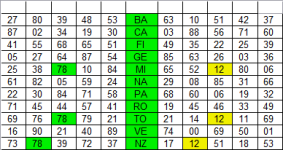
ho risolto, adesso la devo colorare la tabella..
 
Codice:
Sub Main
   Dim A,B,C,D,E,V
   Dim R1
   Dim aT(7)
   Dim AV(11)
   '
   For es = EstrazioneFin - 10 To EstrazioneFin
      '
      aT(7) = " "
      Call InitTabella(aT)
      '
      For R1 = 1 To 12
         If R1 = 11 Then R1 = 12 End If
         A = Estratto(es,R1,1)
         B = Estratto(es,R1,2)
         C = Estratto(es,R1,3)
         D = Estratto(es,R1,4)
         E = Estratto(es,R1,5)
         '
         AV(1) = Format2(90 - A)
         AV(2) = Format2(90 - B)
         AV(3) = Format2(90 - C)
         AV(4) = Format2(90 - D)
         AV(5) = Format2(90 - E)
         '
         Call AddRigaTabella(AV)
         If AV(1) = 78 Then
            Call SetColoreCella(1,RGB(240,240,0),RGB(0,0,0))
         Else
            Call SetColoreCella(1,RGB(255,255,255),RGB(0,0,0))
         End If
         If AV(2) = 78 Then
            Call SetColoreCella(2,RGB(240,240,0),RGB(0,0,0))
         Else
            Call SetColoreCella(2,RGB(255,255,255),RGB(0,0,0))
         End If
         If AV(3) = 78 Then
            Call SetColoreCella(3,RGB(240,240,0),RGB(0,0,0))
         Else
            Call SetColoreCella(3,RGB(255,255,255),RGB(0,0,0))
         End If
         If AV(4) = 78 Then
            Call SetColoreCella(4,RGB(240,240,0),RGB(0,0,0))
         Else
            Call SetColoreCella(4,RGB(255,255,255),RGB(0,0,0))
         End If
         If AV(5) = 78 Then
            Call SetColoreCella(5,RGB(240,240,0),RGB(0,0,0))
         Else
            Call SetColoreCella(5,RGB(255,255,255),RGB(0,0,0))
         End If
         '
      Next
      Call SetTableWidth("19%")
      CreaTabella
   Next
End Sub

invece di scrivere il numero 78 in setcolore si puo scrivere in Inputbox..??
in modo da evidenziare un numero a scelta nella tabella..
 
Ultima modifica:
Codice:
Sub Main
   Dim A,B,C,D,E,V
   Dim R1
   Dim aT(7)
   Dim AV(11)
   '
   V = InputBox("1numero")
   For es = EstrazioneFin - 10 To EstrazioneFin
      '
      aT(7) = " "
      Call InitTabella(aT)
      '
      For R1 = 1 To 12
         If R1 = 11 Then R1 = 12 End If
         A = Estratto(es,R1,1)
         B = Estratto(es,R1,2)
         C = Estratto(es,R1,3)
         D = Estratto(es,R1,4)
         E = Estratto(es,R1,5)
         '
         AV(1) = Format2(90 - A)
         AV(2) = Format2(90 - B)
         AV(3) = Format2(90 - C)
         AV(4) = Format2(90 - D)
         AV(5) = Format2(90 - E)
         '
         Call AddRigaTabella(AV)
         If AV(1) = V Then
            Call SetColoreCella(1,RGB(240,240,0),RGB(0,0,0))
         Else
            Call SetColoreCella(1,RGB(255,255,255),RGB(0,0,0))
         End If
         If AV(2) = V Then
            Call SetColoreCella(2,RGB(240,240,0),RGB(0,0,0))
         Else
            Call SetColoreCella(2,RGB(255,255,255),RGB(0,0,0))
         End If
         If AV(3) = V Then
            Call SetColoreCella(3,RGB(240,240,0),RGB(0,0,0))
         Else
            Call SetColoreCella(3,RGB(255,255,255),RGB(0,0,0))
         End If
         If AV(4) = V Then
            Call SetColoreCella(4,RGB(240,240,0),RGB(0,0,0))
         Else
            Call SetColoreCella(4,RGB(255,255,255),RGB(0,0,0))
         End If
         If AV(5) = V Then
            Call SetColoreCella(5,RGB(240,240,0),RGB(0,0,0))
         Else
            Call SetColoreCella(5,RGB(255,255,255),RGB(0,0,0))
         End If
         '
      Next
      Call SetTableWidth("19%")
      CreaTabella
   Next
End Sub

ho risolto ho aggiunto Inputbox, adesso si dovrà aggiungere la sigla delle ruote..
 
Ultima modifica:
Hai scritto molto codice, usato molte variabili, dimenticato un Fuori90.

Devi imparare ad usare i cicli For-Next e While.

Codice:
Option Explicit
Sub Main
   Dim Es
   Dim R
   Dim P
   Dim V
   Dim aT
   Dim AV(6)
   '
   V = InputBox("Numero da evidenziare","INSERISCI","00")
   For Es = EstrazioneFin - 10 To EstrazioneFin
      '
      Scrivi DataEstrazione(Es),True
      aT = Array("","RU","1°","2°","3°","4°","5°")
      Call InitTabella(aT)
      For R = 1 To 12
         If R = 11 Then R = 12 'End If
         AV(1) = SiglaRuota(R)
         For P = 1 To 5
            AV(P + 1) = Format2(90 - Estratto(Es,R,P))
         Next
         Call AddRigaTabella(AV)
         For P = 1 To 5
            If AV(P + 1) = V Then Call SetColoreCella(P + 1,RGB(240,240,0),RGB(0,0,0))
         Next
      Next
      Call SetTableWidth("10%")
      CreaTabella
   Next
End Sub

:)
 
Ultima modifica:
Joe volevo chiederti se riesci a modificare questo script, in pratica lo script dovrebbe evidenziare
tutti gli ambi ripetuti che sono usciti in una estr..
ho provato in tutti i modi ma non ci sono riuscito..
grazie per lo script..


Codice:
Option Explicit
Sub Main
   Dim Es
   For Es = EstrazioneFin - 0 To EstrazioneFin
      Disegno Es
   Next
End Sub
Sub Disegno(Es)
   Dim R,E,N(1),rur(1),rur1(1),freeq1,freeq2,freeq3
   Dim nRighe,nColonne
   Dim nCaselleDaEvid
   Dim anum1(90)
   Dim Totale,Total
   Dim aQuadroNum
   Dim aNumDaEvid
   nRighe = 12
   nColonne = 6
   ReDim aQuadroNum(nRighe,nColonne)
   ReDim aNumDaEvid(90,1)
   rur(1) = 11
   rur1(1) = 12
   For R = 1 To 12
      For E = 1 To 5
         N(1) = Estratto(Es,R,E)
         freeq1 = SerieFreq(Es,Es,N,rur,1)
         freeq2 = SerieFreq(Es,Es,N,rur1,1)
         freeq3 = freeq1 + freeq2
         If freeq3 > 2 Then
            aQuadroNum(R,E) = Estratto(Es,R,E)
            If(aQuadroNum(R,E)) = N(1) Then
               anum1(N(1)) = N(1)
               nCaselleDaEvid = nCaselleDaEvid + 1
               aNumDaEvid(nCaselleDaEvid,0) = R
               aNumDaEvid(nCaselleDaEvid,1) = E
            End If
         End If
      Next
   Next
   Call DisegnaEstrazione(Es,aNumDaEvid,CLng(0))
   Scrivi
   Scrivi
End Sub

questo script la scritto Cinzia27 e dopo ai modificato te lo script..
ai aggiunto
Disegno Es

non lo so se si puo fare perche ci a provato anche Cinzia ma non ci e riuscita..
tutti gli ambi ripetuti lo script li deve evidenziare in unica tabella..
ma una cosa e evidenziare i numeri ripetuti e un altra cosa e evidenziare gli ambi ripetuti..
e qua sta la difficoltà ho provato in tutti i modi..
 
Ultima modifica:
Codice:
Option Explicit
Sub Main
   Dim R,E,X,I,RB,RX,RK,K,Z,RT,RF,N(1),rur(1),rur1(1),freeq1,freeq2,freeq3
   Dim nRighe,nColonne
   Dim nCaselleDaEvid
   Dim cifra
   Dim qt,anum1,anum2,anum3
   Dim Totale,Total
   Dim stesto
   Dim aQuadroNum
   Dim aNumDaEvid
   ' predispone le dimensioni della matrice che contiene i numeri
   nRighe = 12
   nColonne = 6
   ReDim aQuadroNum(nRighe,nColonne)
   ReDim aNumDaEvid(100,1) ' dato che non so a priori la quantita di numeri metto 100
   rur(1) = 11
   rur1(1) = 12
   X = InputBox("Quante estrazioni vuoi controllare?",,0)
   ReDim anum(0)
   'qt = ScegliNumeri(anum1)
   'qt = ScegliNumeri(anum2)
   'qt = ScegliNumeri(anum3)
   For R = 1 To 12
      For E = 1 To 5
         For I = 1 To 90
            N(1) = I
            freeq1 = SerieFreq(EstrazioneFin - X,EstrazioneFin - X,N,rur,1)
            freeq2 = SerieFreq(EstrazioneFin - X,EstrazioneFin - X,N,rur1,1)
            freeq3 = freeq1 + freeq2
            If freeq3 > 1 Then
            aQuadroNum(R,E) = Estratto(EstrazioneFin - X,R,E)
            stesto = Fuori90(Format2(I)) & "."
            '
            'If Cadenza(N(1)) = 1 Or Decina(N(1)) = 1 Or Figura(N(1)) = 1 Then
               '
               'If E < 2 Then ' EVIDENZIA LA 1°COLONNA
               'If N(1) > 10 Then  ' EVIDENZIA TUTTI I NUMERI DOPO IL 10
               If(aQuadroNum(R,E)) = N(1) Then
                  Totale = Totale +(aQuadroNum(R,E))
                  Total = Total + 1
                  nCaselleDaEvid = nCaselleDaEvid + 1
                  '
                  aNumDaEvid(nCaselleDaEvid,0) = R
                  aNumDaEvid(nCaselleDaEvid,1) = E
                  '
                  Scrivi stesto,0,0,1,5
                  '
               End If
            End If
            'End If
         Next
      Next
   Next
   'Next
   'Call DisegnaEstrazioneQN(aQuadroNum,aNumDaEvid)
   'Call DisegnaEstrazioneQN(aQuadroNum,aNumDaEvid,CLng(0))
   Call DisegnaEstrazione(EstrazioneFin - X,aNumDaEvid,CLng(0))
   'Scrivi(DataEstrazione(EstrazioneFin - X)),0,0,1,3,4
   'Scrivi stesto
   'Scrivi StringaNumeri(anum2)
   'Scrivi StringaNumeri(anum3)
   'Scrivi stesto,0,1,1,5,4
   Scrivi
   Scrivi
   Scrivi "  " & Total & " numeri ripetuti   ",0,1,1,5
   Scrivi
   Scrivi " totale " & Totale & "",0,1,3,1
   Scrivi
End Sub

Joe se no prova questo script la modificato Cinzia27
se non si puo fare non fa niente..
 
Ultima modifica:
Hai scritto molto codice, usato molte variabili, dimenticato un Fuori90.

Devi imparare ad usare i cicli For-Next e While.

Codice:
Option Explicit
Sub Main
   Dim Es
   Dim R
   Dim P
   Dim V
   Dim aT
   Dim AV(6)
   '
   V = InputBox("Numero da evidenziare","INSERISCI","00")
   For Es = EstrazioneFin - 10 To EstrazioneFin
      '
      Scrivi DataEstrazione(Es),True
      aT = Array("","RU","1°","2°","3°","4°","5°")
      Call InitTabella(aT)
      For R = 1 To 12
         If R = 11 Then R = 12 'End If
         AV(1) = SiglaRuota(R)
         For P = 1 To 5
            AV(P + 1) = Format2(90 - Estratto(Es,R,P))
         Next
         Call AddRigaTabella(AV)
         For P = 1 To 5
            If AV(P + 1) = V Then Call SetColoreCella(P + 1,RGB(240,240,0),RGB(0,0,0))
         Next
      Next
      Call SetTableWidth("10%")
      CreaTabella
   Next
End Sub

:)

Joe i miei script li scrivo a modo mio..

7779.PNG
 
Ultima modifica:
Joe volevo realizzare questa tabella e lo realizzata ma grazie a Mike58 ho imparato a
scrivere gli script certo uno che e esperto questo script sarebbe facile da scrivere
ma chi e all inizio e non sa da dove iniziare uno script diventa davvero difficile scrivere lo script
quello che conta non e tanto come e scritto lo script ma cio che si vuole dall'out dello script..
questa tabella calcola il resto di ogni numero estratto..
e si puo evidenziare in tabella qualsiasi numero..


Codice:
Sub Main
   Dim A,B,C,D,E,V,Z
   Dim R1
   Dim aT(11)
   Dim AV(11)
   '
   V = InputBox("1numero")
   Z = InputBox("2numero")
   For es = EstrazioneFin - 0 To EstrazioneFin
      '
      aT(11) = " "
      Call InitTabella(aT)
      For R1 = 1 To 12
         If R1 = 11 Then R1 = 12 End If
         '
         A = Estratto(es,R1,1)
         B = Estratto(es,R1,2)
         C = Estratto(es,R1,3)
         D = Estratto(es,R1,4)
         E = Estratto(es,R1,5)
         '
         AV(1) = Format2(A)
         AV(2) = Format2(B)
         AV(3) = Format2(C)
         AV(4) = Format2(D)
         AV(5) = Format2(E)
         AV(6) = SiglaRuota(R1)
         AV(7) = Format2(90 - A)
         AV(8) = Format2(90 - B)
         AV(9) = Format2(90 - C)
         AV(10) = Format2(90 - D)
         AV(11) = Format2(90 - E)
         '
         '
         Call AddRigaTabella(AV)
         If AV(1) = V Then
            Call SetColoreCella(1,RGB(0,240,0),RGB(0,0,0))
         End If
         If AV(2) = V Then
            Call SetColoreCella(2,RGB(0,240,0),RGB(0,0,0))
         End If
         If AV(3) = V Then
            Call SetColoreCella(3,RGB(0,240,0),RGB(0,0,0))
         End If
         If AV(4) = V Then
            Call SetColoreCella(4,RGB(0,240,0),RGB(0,0,0))
         End If
         If AV(5) = V Then
            Call SetColoreCella(5,RGB(0,240,0),RGB(0,0,0))
         End If
         '
         '-------------------------------
         Call SetColoreCella(6,RGB(0,240,0),RGB(0,0,0))
         '-------------------------------
         If AV(7) = Z Then
            Call SetColoreCella(7,RGB(240,240,0),RGB(0,0,0))
         End If
         If AV(8) = Z Then
            Call SetColoreCella(8,RGB(240,240,0),RGB(0,0,0))
         End If
         If AV(9) = Z Then
            Call SetColoreCella(9,RGB(240,240,0),RGB(0,0,0))
         End If
         If AV(10) = Z Then
            Call SetColoreCella(10,RGB(240,240,0),RGB(0,0,0))
         End If
         If AV(11) = Z Then
            Call SetColoreCella(11,RGB(240,240,0),RGB(0,0,0))
         End If
      Next
      Call SetTableWidth("25%")
      CreaTabella
   Next
End Sub
 
Ultima modifica:
Codice:
Sub Main
   Dim A,B,C,D,E,V,Z
   Dim R1
   Dim aT(12)
   Dim AV(12)
   '
   V = InputBox("1numero")
   Z = InputBox("2numero")
   '
   tx = InputBox("Quante estrazioni vuoi controllare?",,0)
   '
   For es = EstrazioneFin - tx To EstrazioneFin
      AvanzamentoElab EstrazioneFin - tx,EstrazioneFin,es
      '
      aT(12) = " "
      Call InitTabella(aT)
      '
      For R1 = 1 To 12
         If R1 = 11 Then R1 = 12 End If
         '
         A = Estratto(es,R1,1)
         B = Estratto(es,R1,2)
         C = Estratto(es,R1,3)
         D = Estratto(es,R1,4)
         E = Estratto(es,R1,5)
         '
         AV(1) = Format2(A)
         AV(2) = Format2(B)
         AV(3) = Format2(C)
         AV(4) = Format2(D)
         AV(5) = Format2(E)
         AV(6) = SiglaRuota(R1)
         AV(7) = Format2(90 - A)
         AV(8) = Format2(90 - B)
         AV(9) = Format2(90 - C)
         AV(10) = Format2(90 - D)
         AV(11) = Format2(90 - E)
         AV(12) = DataEstrazione(Es)
         '
         '
         Call AddRigaTabella(AV)
         If AV(1) = V Then
            Call SetColoreCella(1,RGB(0,240,0),RGB(0,0,0))
            Call SetColoreCella(12,RGB(0,240,0),RGB(0,0,0))
         End If
         If AV(2) = V Then
            Call SetColoreCella(2,RGB(0,240,0),RGB(0,0,0))
            Call SetColoreCella(12,RGB(0,240,0),RGB(0,0,0))
         End If
         If AV(3) = V Then
            Call SetColoreCella(3,RGB(0,240,0),RGB(0,0,0))
            Call SetColoreCella(12,RGB(0,240,0),RGB(0,0,0))
         End If
         If AV(4) = V Then
            Call SetColoreCella(4,RGB(0,240,0),RGB(0,0,0))
            Call SetColoreCella(12,RGB(0,240,0),RGB(0,0,0))
         End If
         If AV(5) = V Then
            Call SetColoreCella(5,RGB(0,240,0),RGB(0,0,0))
            Call SetColoreCella(12,RGB(0,240,0),RGB(0,0,0))
         End If
         '
         '-------------------------------
         Call SetColoreCella(6,RGB(0,240,0),RGB(0,0,0))
         '-------------------------------
         If AV(7) = Z Then
            Call SetColoreCella(7,RGB(240,240,0),RGB(0,0,0))
            Call SetColoreCella(12,RGB(0,240,0),RGB(0,0,0))
         End If
         If AV(8) = Z Then
            Call SetColoreCella(8,RGB(240,240,0),RGB(0,0,0))
            Call SetColoreCella(12,RGB(0,240,0),RGB(0,0,0))
         End If
         If AV(9) = Z Then
            Call SetColoreCella(9,RGB(240,240,0),RGB(0,0,0))
            Call SetColoreCella(12,RGB(0,240,0),RGB(0,0,0))
         End If
         If AV(10) = Z Then
            Call SetColoreCella(10,RGB(240,240,0),RGB(0,0,0))
            Call SetColoreCella(12,RGB(0,240,0),RGB(0,0,0))
         End If
         If AV(11) = Z Then
            Call SetColoreCella(11,RGB(240,240,0),RGB(0,0,0))
            Call SetColoreCella(12,RGB(0,240,0),RGB(0,0,0))
         End If
      Next
      Call SetTableWidth("25%")
      CreaTabella
   Next
End Sub

ho aggiunto la data delle estrazioni
 
Joe volevo chiederti se riesci a modificare questo script, in pratica lo script dovrebbe evidenziare
tutti gli ambi ripetuti che sono usciti in una estr..
ho provato in tutti i modi ma non ci sono riuscito..
grazie per lo script..

Se evidenziare gli Ambi Bivalenti è diffice volerlo fare come piace a te ... a modo tuo ...

è, secondo il mio modesto parere ... più difficile.

L'unica cosa che ti posso dire che se non fosse possibile ...

... non ci sarebbero programmi che lo fanno.

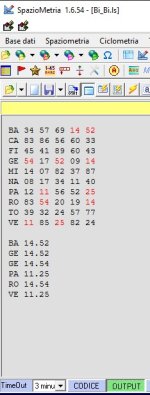
Bi_Bi.jpg

MA ... non mi chiedere lo script, perchè non è disponibile.

:)
 
7780.PNG

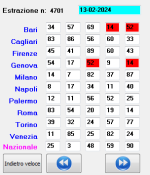
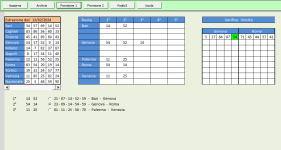
in effetti anche lotto++gold evidenzia solo un ambo ripetuto
e bisogna cambiare sempre la ruota di base
 
Ultima modifica:
Se evidenziare gli Ambi Bivalenti è diffice volerlo fare come piace a te ... a modo tuo ...

è, secondo il mio modesto parere ... più difficile.

L'unica cosa che ti posso dire che se non fosse possibile ...

... non ci sarebbero programmi che lo fanno.

Vedi l'allegato 2278564

MA ... non mi chiedere lo script, perchè non è disponibile.

:)

Joe non devo chiedere gli script a nessuno..ho piu di duemila script a chi devo chiedere gli script..
 
Stato
Chiusa ad ulteriori risposte.

Ultima estrazione Lotto

  • Estrazione del lotto
    sabato 16 maggio 2026
    Bari
    84
    57
    09
    22
    60
    Cagliari
    52
    58
    80
    57
    76
    Firenze
    50
    15
    63
    58
    60
    Genova
    08
    30
    61
    75
    55
    Milano
    82
    68
    29
    16
    10
    Napoli
    86
    46
    15
    33
    65
    Palermo
    46
    29
    73
    74
    37
    Roma
    30
    15
    02
    87
    52
    Torino
    15
    62
    82
    52
    67
    Venezia
    58
    85
    40
    35
    48
    Nazionale
    16
    51
    56
    71
    17
    Estrazione Simbolotto
    Milano
    18
    07
    27
    32
    12
Indietro
Alto